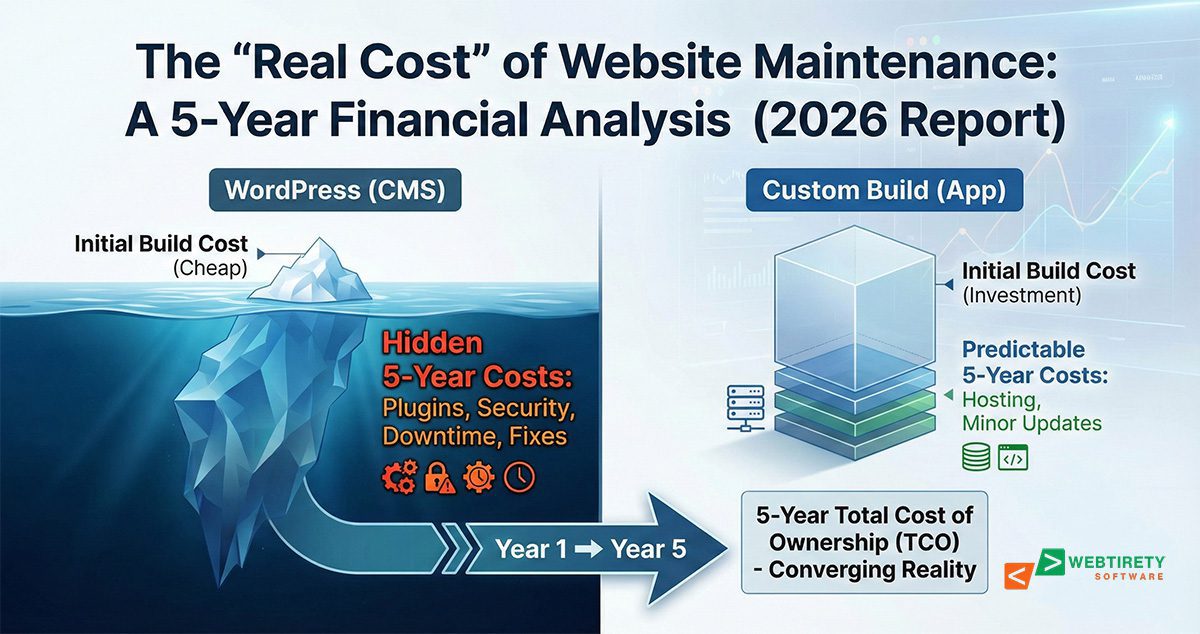
Why Website Maintenance Matters
Why Website Maintenance Matters: Risks, Benefits & Proven Strategies
In 2025, a business website is more than just a digital brochure, it’s the beating heart of credibility, visibility, and conversion. Yet too many brands treat website maintenance as an afterthought, leaving the digital door wide open for lost revenue, data breaches, and frustrated visitors. Why does website maintenance matter, and how can proactive care supercharge ROI? Uncover the real risks, top benefits, and proven strategies to keep your website fast, secure, and ranking at the top.
The Real Risks of Neglecting Website Maintenance
Let’s clear the air: website neglect is never silent. Hidden problems like broken links, outdated plugins, or expired SSL certificates almost always boil over into business losses.
1. Security Breaches:
Cyber-attacks are no longer a distant threat. Outdated CMS, themes, and plugins are hackers’ favorite entry points. A single vulnerability exploited could mean data theft, blacklisting, or a site locked by ransomware. Frequent maintenance applying patches, updating passwords, running security scans prevents avoidable catastrophes.
2. SEO & Ranking Drops:
Google’s algorithm rewards quality and freshness. Broken links, missing images, slow loading speeds, and outdated content quickly push even established sites down the rankings. Long-term neglect could lose years of hard-earned visibility and organic traffic.
3. Loss of User Trust:
Visitors are instantly put off by slow load times, pop-up errors, and expired SSL warnings. A neglected website signals neglect in business, potentially sending leads straight to the competition.
4. Compliance Failures:
Privacy regulations (GDPR, CCPA) and industry-specific compliance change fast. Yearly reviews of privacy policies, terms, and accessibility features avoid legal pitfalls and fines.
5. Catastrophic Data Loss:
Without proper backups, a server glitch, hack, or human error could wipe years of business data. Regular automated backups are your only safety net.
Key Benefits of Ongoing Website Maintenance
A well-maintained website isn’t just “safe”; it’s a powerful engine for growth.
- Enhanced Security: Routine updates and security scans block emerging cyber threats before they escalate.
- Peak Performance: Optimized images, efficient code, and a tidy backend keep every page lightning-fast, boosting SEO and conversions.
- Better User Experience: Fixing errors, cleaning navigation, and ensuring mobile responsiveness delight visitors and keep them longer.
- Consistent Lead Generation: Working forms, updated CTAs, and live chat integrations ensure zero lost opportunities.
- SEO Wins: Regular content audits, link fixes, and structural improvements tell Google your site is authoritative and up-to-date, ensuring higher rankings for crucial keywords.
- Brand Authority: Fresh blog posts, updated case studies, and portfolio content showcase industry leadership and innovation.
- Lower Long-Term Costs: Preventing issues is always less expensive than emergency fixes or a total website rebuild.
Proven Strategies for Effective Website Maintenance
The best approach is both proactive and systematic. Here’s a comprehensive plan for 2025:
1. Weekly Website Maintenance Tasks
- Back Up Website Data:
Set up automatic backups to cloud storage or secure servers. Restore functionality in minutes if disaster strikes. - Fix Broken Links:
Regular scans spot dead links or missing files, protecting UX and SEO. - Monitor Performance Metrics:
Use tools like Google Analytics, GTmetrix, or Google Search Console to catch traffic drops, bounce rates, and site health issues. - Update Content:
Tweak typos, replace old references, and refresh homepage banners or announcements.
2. Monthly Tasks
- Check CMS, Plugins, and Themes:
Apply the latest updates for your website platform (WordPress, Shopify, etc.) and all extensions. Prevents security flaws and unlocks new features. - SEO Review:
Audit keyword rankings, meta descriptions, and alt tags. Use tools like SEMrush, Ahrefs, or Moz for insights and quick wins. - Test Interactive Elements:
Ensure forms, ecommerce carts, login flows, and chatbots are working seamlessly. - Image & Media Optimization:
Compress new images and remove outdated files to improve speed. - Clear Cache & Optimize Database:
Purge unnecessary files, spam comments, or database bloat for cleaner operation.
3. Quarterly Tasks
- Content Audit:
Update old blog posts, product pages, and portfolio projects for relevance, accuracy, and new keywords. - Design Review:
Evaluate your layout, branding, and mobile responsiveness against current UX trends or user feedback. - Security Audit:
Perform a deeper scan for vulnerabilities using security plugins (Wordfence, Sucuri, etc.) or hire a professional service.
4. Annual Maintenance Steps
- Renew Domain & SSL:
Check expiration dates to avoid service interruptions or trust warnings. - Review Hosting Plans:
Assess whether your hosting still fits your bandwidth, speed, and security needs. - Legal & Compliance Updates:
Revise privacy policy, terms of use, and accessibility based on the latest laws. - Strategic Planning:
Set new goals, review analytics, and plan big updates or redesigns.
Tools and Resources for Maintenance Mastery
- Backup Tools: UpdraftPlus, CodeGuard, or personalized hosting backups for peace of mind.
- Security Solutions: Sucuri, Wordfence, and SiteLock keep hackers at bay.
- Performance Monitors: GTmetrix, Google PageSpeed Insights, and New Relic spotlight bottlenecks.
- SEO Optimizers: Yoast SEO, Ahrefs, SEMrush deliver actionable insights.
Outsourcing to a website maintenance service ensures these checks never slip through the cracks, ideal for growing businesses ready to streamline and focus on customers.
Action Steps: Don’t Wait Secure Your Digital Investment
A quick “set-and-forget” approach doesn’t work for modern websites. Make maintenance a regular part of your digital strategy:
- Create a personalized checklist combining weekly, monthly, and annual tasks.
- Leverage automation to schedule backups, scans, and updates.
- Monitor, measure, and respond to analytics data, not just once, but regularly.
- Partner with professionals for advanced needs like security audits, disaster recovery, or UX overhaul.
- Read Our Website Security Guide for Website Owners – Website Security 101: Protecting Your Site from Hacks, Malware, SEO Spam & More
The Bottom Line: Website Maintenance Is Business Insurance
A well-maintained website is more than just “working” it’s faster, safer, easier to use, and always ready to convert visitors into delighted customers. Treat your website as a living, growing business asset. Invest in continuous care, and your site will reward you with years of results and resilience, no matter how technology or consumer trends evolve.
Ready to secure your business’s most valuable digital asset? Don’t wait for a crisis, start your website maintenance journey today!
🙋♂️Frequently Asked Questions
Key tasks include backups, software/plugin updates, fixing broken links, content updates, security checks, performance monitoring, database optimization, mobile responsiveness reviews, and legal compliance audits.
Maintenance is best done on a regular schedule, weekly for backups and error checks, monthly for updates and audit tasks, quarterly for content/design/security reviews, and annually for major technical, compliance, and strategic evaluations.
Neglecting website maintenance can lead to hacking, data loss, poor user experience, slow performance, broken SEO rankings, legal or compliance issues, and a damaged reputation with potential customers.
Yes. Regular fixes (like updating content, resolving errors, optimizing speed, and maintaining mobile usability) help websites stay in good standing with Google, which means higher rankings and more organic traffic.
For basic tasks, owners or staff can manage website maintenance using checklists and automation tools. However, complex sites or businesses handling sensitive data should consider hiring professional maintenance services to reduce risks and save time.
Popular tools include UpdraftPlus for backups, SiteLock and Sucuri for security, GTmetrix for performance, and Yoast SEO or SEMrush for optimization and analytics.
Costs vary by website size and complexity. Personal blogs can cost as little as ₹1500 -₹1999/month ($25–50/month), while small business or ecommerce sites may need ₹3000 – ₹4000/month ($200–1,000/month). Investing in maintenance prevents expensive emergencies down the road.


I’m Manas Ranjan Sahoo: Developer/Founder of “Webtirety Software”. I’m a Full-time Software Professional and committed to expanding Webtirety Software into a thriving platform that empowers businesses and individuals alike. I love to Write Blogs on Software, Technology, eCommerce, SEO, and Digital Marketing.